Open 24/7, including holidays
Free estimate, call (416) 897-1773
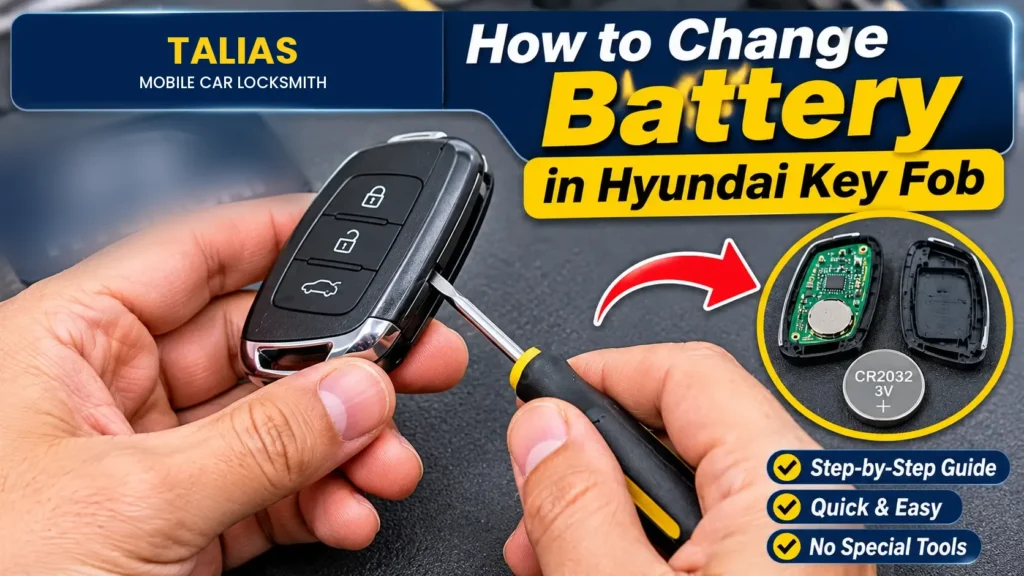
Here is how to change battery in Hyundai key fob at home in about five minutes with a small flat tool. Newer Hyundai smart keys often take a CR2450 and remote or flip keys usually take a CR2032. Below you will find the steps for each key type, which way the battery goes, how to start your Hyundai with a dead fob, and what to do if the key still will not work.
Pull out the emergency key, twist the case open at the slot with a slim tool, swap the old battery for one with the same code (often CR2450 on smart keys, CR2032 on remotes) facing the same way, snap it shut and test it.
It depends on the type of key. Most online guides say every Hyundai uses a CR2032, but that is not the whole story. Hyundai's owner's manual for the 2025 Tucson lists a CR2450 for the smart key, and several other recent Hyundai manuals list the same cell. Remote and flip keys, such as the 2024 Elantra remote key, use a CR2032.
| Hyundai key style | How you start the car | Battery |
|---|---|---|
| Smart key on many newer models | Push button start, key stays in your pocket | Often CR2450, for example the 2025 Tucson |
| Remote or flip key | Key turns in the ignition | Usually CR2032, for example the 2024 Elantra remote key |
| Older smart keys and remotes | Either | Varies by model and year |
A coin cell does not die all at once. It fades over weeks, and your Hyundai gives you a few hints:
Cold weather makes all of this worse. A fob that worked fine in the fall can quit on a January morning in Mississauga or Milton, so a Hyundai key fob battery replacement is worth doing as soon as the first sign shows up.
This is the fob you keep in your pocket or bag on a Hyundai with push button start, such as a newer Tucson, Santa Fe, Kona, Elantra, Sonata or Palisade. Hyundai's manuals describe the same basic method for these keys: open the rear cover with a slim tool, swap the battery and close the cover again.
Layouts differ a little between models and years. Some fobs open from the bottom edge and some have a small inner cover over the battery. If yours looks different, check your owner's manual before you pry.
Hyundais that start with a turning key often have a flip key or a separate remote. To replace the battery in a Hyundai key fob of this kind:
Put the new battery in exactly the way the old one came out. Hyundai's manuals say to fit the battery with the correct polarity, but they do not say which side faces up, and other guides disagree with each other. Some say the plus (+) side with the writing faces up, others say it faces down, and the answer can change from one fob to the next.
That is why the photo in step four matters. A battery that went in upside down is the most common reason a fob still does nothing after you change battery in Hyundai key fob at home.
Changing the battery should not erase the link between your key and your car. If the fob is still dead or the car still shows key not detected, run through these first.
If the fob got wet, was dropped hard, or the buttons work but the car still will not detect the key, the problem is not the battery. The board inside may be damaged or the key may need to be programmed again. That needs a key programmer, not a new coin cell.
We test, program and replace Hyundai smart keys and remotes at your car across Mississauga and the GTA.
A flat smart key battery does not have to leave you stranded. Hyundai builds in a back-up for both getting in and starting up.
Take the emergency key out of the fob. On many newer Hyundais the driver door keyhole is hidden behind a small cover at the end of the door handle. Hyundai's manuals show how to remove it: push the release on the underside and lift the cover off with the key. Then unlock the door with the key as normal.
Hyundai's manuals describe this for many push button start models:
Some models use a different method, such as a smart key slot for emergency starting, so check your owner's manual to see which one your Hyundai has. Locked out with the keys inside? Our car lockout service gets you back in without damage, any time of day.
Hyundai's manuals warn that lithium button batteries can cause severe or even fatal injuries within two hours if swallowed. Health Canada gives the same warning about coin cells in the home.
It depends on the key. Many newer Hyundai smart keys, such as the 2025 Tucson smart key, use a CR2450. Remote and flip keys, such as the 2024 Elantra remote key, use a CR2032. Read the code on the old battery or check your owner's manual.
On a smart key, press the release button, pull out the emergency key, then put a slim flat tool in the slot and gently twist the rear cover open. On a flip key or remote, look for a seam or a small screw on the case.
Normally no. A battery change does not usually erase the pairing. If the key still does not work, check the battery direction and size first. If the car still does not detect the key, it may need programming.
No. A CR2450 is larger than a CR2032, so a CR2032 will sit loose and lose contact. Always use the same code as the old battery.
Unlock the door with the emergency key hidden in the fob. Then press the brake and press the Engine Start/Stop button with the smart key itself. Some models use a smart key slot instead, so check your owner's manual.
Yes. If a new battery does not fix it, our mobile technicians check the fob at your car and can program or replace a Hyundai smart key or remote anywhere in Mississauga, Brampton, Toronto, Oakville or Milton. Call (416) 897-1773 for a free quote.
Free estimate on the phone, 24/7 in Mississauga and the GTA.